
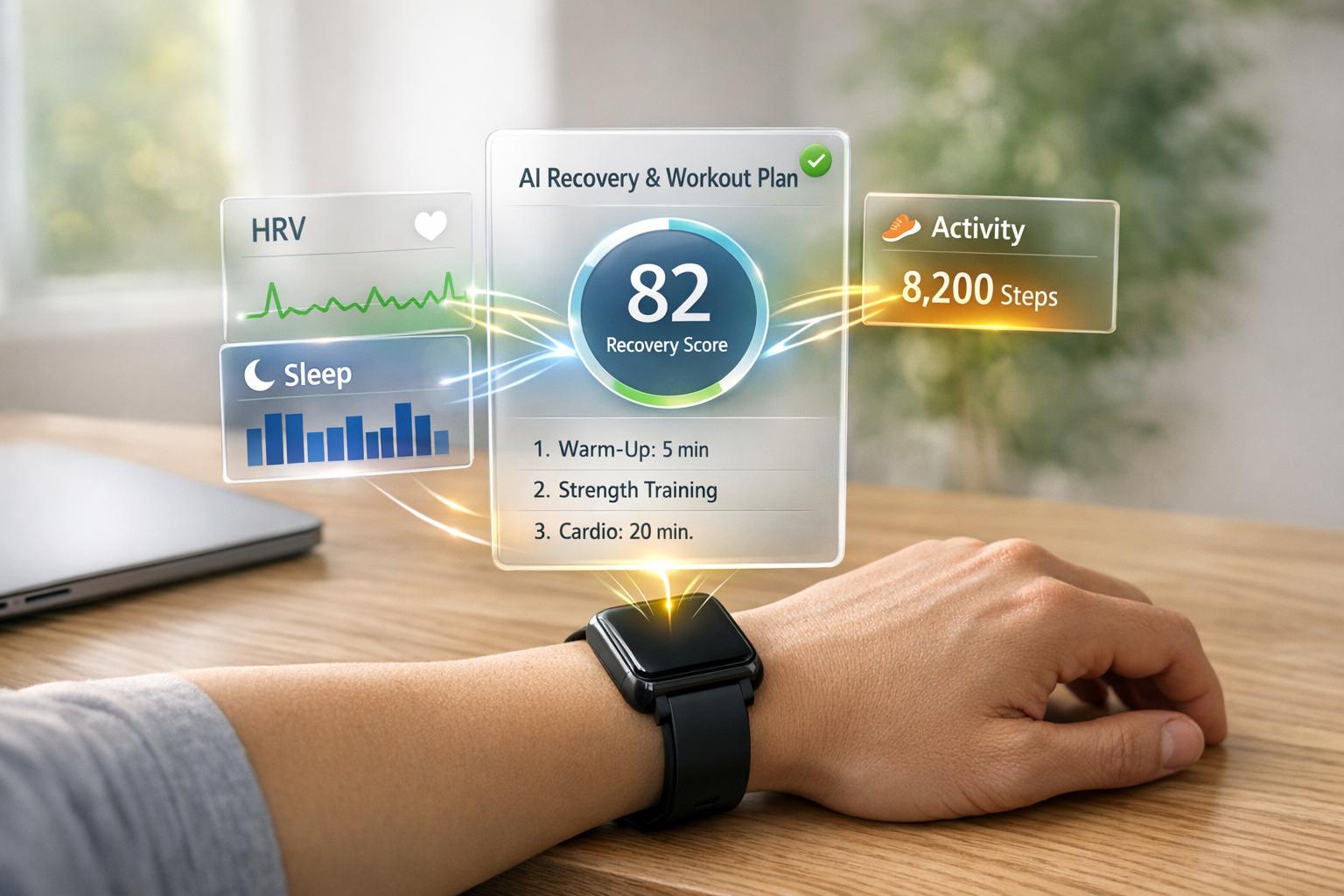
Wearable devices are no longer just fitness trackers - they now connect with apps to provide a complete picture of your health. By integrating data like heart rate, sleep patterns, and activity levels, these systems turn raw numbers into actionable insights. This means you can get real-time suggestions, like breathing exercises to manage stress or tips to improve recovery after workouts. Despite their potential, many users stop using wearables due to scattered data. Integration solves this by centralizing everything into one app, making your health data easier to understand and use. Here's everything you need to know about how these systems work, the metrics they track, and how to use them effectively.
Exercise is Medicine: Wearable technology for health and wellness | Ohio State Medical Center

sbb-itb-f5765c6
Key Metrics Tracked by Wearables
Wearable Wellness Metrics: What Your Device Tracks & Why It Matters
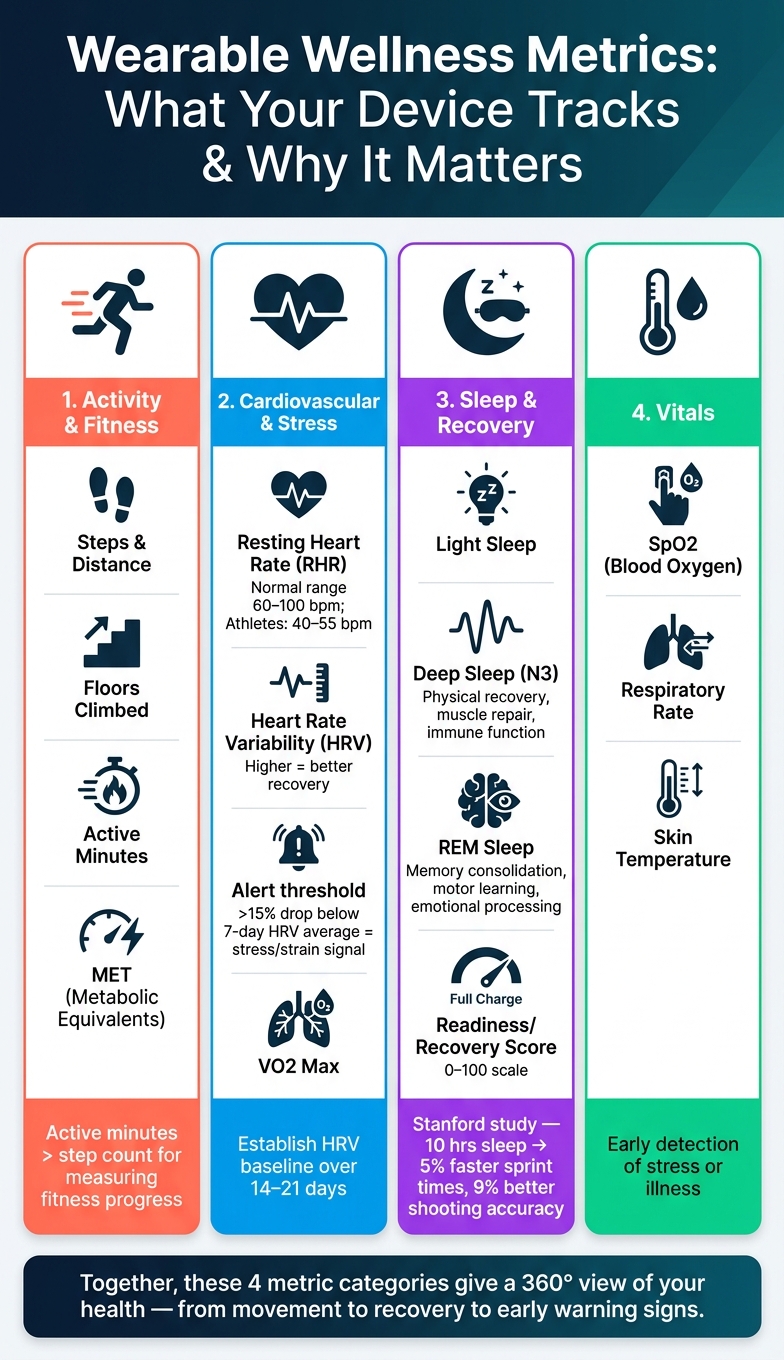
Modern wearables are packed with features that track a variety of health and fitness metrics, offering insights tailored to your personal wellness. These devices integrate with wellness apps to provide data-driven guidance. Let’s break these metrics into three key categories: activity, cardiovascular health, and sleep data, to understand their role in improving well-being.
Activity and Fitness Metrics
Most wearables track familiar stats like steps, distance, floors climbed, and active minutes. They also measure metabolic equivalents (MET), which gauge the intensity of your activities. While step count remains a popular metric, it’s not always the best indicator of fitness. For instance, 10,000 steps of casual strolling don’t compare to 30 minutes of focused exercise. That’s where active minutes come in - they highlight intentional physical activity, making them a more reliable measure of fitness progress.
Cardiovascular and Stress Metrics
Tracking your cardiovascular health offers deeper insights into fitness, recovery, and stress management. Two standout metrics here are resting heart rate (RHR) and heart rate variability (HRV) in wearables.
- Resting Heart Rate (RHR): This is measured when your body is completely at rest, often during sleep. For most adults, RHR falls between 60–100 bpm, while trained athletes might see lower readings, typically around 40–55 bpm. A gradual decrease in RHR over time often signals improved cardiovascular fitness.
-
Heart Rate Variability (HRV): This measures the small variations in time between heartbeats. Higher HRV indicates a well-recovered autonomic nervous system, which helps your body adapt to stress. A sudden drop in HRV - more than 15% below your 7-day average - can signal stress, strain, or even early signs of illness. As Google Health explains:
"A significant drop in HRV suggests that your body may be experiencing stress, strain, or showing potential signs of illness." [4]
To make HRV data actionable, establish a baseline over 14–21 days, then use it to guide intensity levels in workouts or recovery efforts [3].
Sleep and Recovery Data
Wearables also break down your sleep into stages: Light, Deep (N3), and REM. Each stage plays a unique role:
- Deep Sleep: Supports physical recovery, releasing growth hormones, aiding muscle repair, and boosting immune function.
- REM Sleep: Focuses on mental recovery, including memory consolidation, motor skill learning, and emotional processing [5].
Many devices combine sleep and recovery data into a readiness or recovery score (ranging from 0–100), which reflects how prepared your body is for the day. Research supports the importance of recovery: a Stanford University study found that basketball players who increased their sleep to 10 hours per night improved sprint times by 5% and shooting accuracy by 9% [5]. A high readiness score signals you’re ready for a challenging day, while a low score suggests prioritizing rest over intense activity.
Key Metrics Overview:
- Activity: Steps, distance, active minutes, and MET track movement and energy use.
- Cardiovascular: RHR, HRV, and VO2 Max provide insights into heart health and stress levels.
- Sleep: Sleep stages, duration, and efficiency support physical and mental recovery.
- Vitals: Metrics like SpO2, respiratory rate, and skin temperature help detect stress or early signs of illness.
How to Connect Wearables to Wellness Apps
Connecting your wearable device to a wellness app is simple, but doing it right can help you avoid issues like missing data or duplicates. Here's how to get started.
Setting Up Device and App Integration
Start by using a central hub: Apple Health for iPhone users or Google Health Connect for Android users (available in Android 14+ and set to replace Google Fit by 2026) [10]. These hubs act as intermediaries - your wearable app, such as Garmin Connect, Oura, or Fitbit, writes data to the hub, and your wellness app reads it. This keeps your data flow smooth and organized.
For example, if you're using Healify, open the app and select the option to connect with Apple Health [6]. When prompted on iOS, choose "Turn On All" to share data [7]. To avoid conflicting or inflated numbers, assign one device per metric - let your Oura Ring track sleep data and your Apple Watch handle heart rate monitoring [8]. Also, make sure Background App Refresh is enabled to keep the sync running without interruptions [7][8].
Once set up, it's a good idea to check for potential issues and address them early.
Fixing Common Integration Problems
Even with a proper setup, issues can arise. Here's a quick guide to common problems and their solutions:
| Issue | Likely Cause | Solution |
|---|---|---|
| Missing data | Permissions not enabled | Go to Settings > Health > Data Access & Devices > [App Name] and ensure all toggles are turned on [7]. |
| Duplicate steps or inflated calorie counts | Multiple apps writing the same metric | Disable "Write" access for secondary apps. Ensure only your primary wearable records the metric [8]. |
| Delayed sync | Battery optimization blocking data transfers | On Android, exclude your health apps from battery-saving mode [8]. |
| Connectivity errors | Outdated app version or poor internet connection | Update the app, check your internet connection, and reconnect the device [9]. |
Before diving into long-term tracking, sync just one day's worth of data and review it for any gaps or odd timestamps [8]. Also, if you're traveling across time zones, keep in mind that this can split sleep logs or shift workout timestamps. After a flight, double-check your data to ensure everything looks accurate [8].
For those using devices that aren't natively compatible - like pairing a Galaxy Ring with an iPhone - third-party tools like Health Sync or Sync Solver can bridge the gap. These tools usually cost between $5 and $25 but can introduce extra points of failure. When possible, stick to native integrations for better reliability.
Using Integrated Data for Personal Wellness
With your devices working together seamlessly, the next step is to turn all that raw data into meaningful strategies for improving your well-being.
Using Activity Metrics to Hit Fitness Goals
Wearables track a variety of metrics - like heart rate zones, active minutes, and movement patterns - that can show how effective your workouts are in reaching your fitness goals. When you look at these data points together, it becomes easier to see how your exercise routine is helping (or hindering) your progress. Sleep data can also play a role here, offering insights into how well your body is recovering after those intense sessions.
Improving Sleep and Recovery with Your Data
Sleep tracking accuracy isn’t just about counting hours. Your wearable goes deeper, monitoring things like sleep stages, overnight heart rate, blood oxygen levels, and heart rate variability (HRV) to assess how well your body is bouncing back. For example, if your two-week HRV trend shows a steady decline, it could mean you’re dealing with fatigue or stress. On days when your data points to high physical strain, you might benefit from eating 30g of protein within an hour after exercising and ensuring you replenish electrolytes. And on those low-energy days, even a short 10-minute walk could help boost your mood without overtaxing your recovery [1]. By letting these recovery metrics guide your daily choices, you can strike a better balance between activity and rest.
But you don’t have to figure all this out on your own - AI can step in to turn these numbers into a personalized health plan.
How AI Turns Your Data into a Personal Health Plan
Gathering data is just the first step; the real magic happens when you analyze it and turn it into actionable insights. Apps like Healify sync directly with Apple Health and review over 150 health metrics, including sleep, heart rate, activity, and stress indicators, to create a daily plan tailored to your needs [11]. Instead of leaving you to decode a complicated dashboard, the AI breaks it all down into simple, actionable steps - like recommending a walk if your activity is low or setting a protein target after a tough workout [1].
Healify’s AI coach, Anna, uses 18 specialized AI agents focused on areas like nutrition, sleep, circadian rhythms, and mental wellness to provide evidence-based suggestions [11]. You can even upload bloodwork or lab results, and the AI will translate those into easy-to-understand insights that fit right into your personalized plan [6].
One beta tester shared their experience:
"I used to feel overwhelmed by all the numbers on my iPhone and Apple Watch. Healify makes them make sense and gives me clear next steps." - Andrea, Beta tester [1]
Healify is free to try - no credit card needed - and offers 30 free conversations with the AI coach so you can see how it works before committing. If you decide to upgrade, the Life+ plan is available for $11.99/month or $99.99/year [11].
Limitations, Safety, and Advanced Use Cases
What Wearables Cannot Do
Wearables have made it easier to track and understand personal wellness, but they’re not without their shortcomings. One of the biggest challenges is data fragmentation - your fitness tracker, health app, and electronic health records often don’t talk to each other. This disconnect can make it hard to get a full picture of your overall health [2].
Another limitation lies in how wearables process data. According to the MDPI Healthcare Journal, many AI methods focus on identifying statistical patterns rather than pinpointing the root causes behind them. For example, a spike in your resting heart rate might signal something’s wrong, but the device won’t explain why [2]. Additionally, unless you manually log details like stressors or mood, wearables miss out on key behavioral and emotional context. For older adults or those managing chronic conditions, professional medical input is still essential before acting on recommendations from AI [2].
| Limitation | What It Means for You |
|---|---|
| Data fragmentation | Wearables often don’t integrate with your full health data. |
| Missing context | Devices can’t capture emotional or behavioral triggers. |
| Statistical, not causal | Patterns are flagged, but the root causes remain unclear. |
| Demographic bias | Models may not work as well for underrepresented groups. |
Even with these limitations, combining wearable data with other health inputs can unlock more advanced tracking possibilities.
Advanced Health Tracking Scenarios
When wearables are paired with other health data, they become much more than just step counters. Integrated systems can monitor real-time physiological changes - like sudden drops in blood oxygen levels or spikes in cortisol - and send alerts before these changes impact your well-being [1]. By analyzing trends in heart rate variability, AI can even detect rising stress levels and suggest actionable solutions, such as breathing exercises or tweaks to your sleep schedule [1][11].
For those managing chronic conditions, combining wearable data with lab results creates a richer dataset for analysis. Take Healify, for example: the app allows users to photograph lab results and integrates them with daily biometric data. This kind of comprehensive approach - merging wearables, lab data, and lifestyle inputs - makes health tracking significantly more detailed [6].
While these advanced features are promising, ensuring the safety and privacy of your data is just as important.
Data Privacy and Security in Wearable Wellness
Your health data deserves protection. When selecting a wellness app, check how and where your data is stored - whether locally on your device, on secure servers, or both. It’s also essential to confirm that your data won’t be sold to third parties.
Healify, for instance, prioritizes privacy:
"Your health data stays on your device and our secure servers. We never sell your data." - Healify Ltd [11]
Look at the app’s privacy label to see which data points are linked to you. Healify, for example, integrates with Apple Health, giving you control over which of the 150+ metrics you share. It also clarifies its role as a tool for wellness education:
"Healify is a wellness education tool, not a medical device. It does not diagnose, treat, cure, or prevent any disease." [11]
This kind of transparency is essential when deciding which platform to trust with your health tracking needs.
Conclusion: What's Next for Wearable Wellness Integration
Wearable devices have come a long way from just tracking steps. When paired with wellness apps, they now monitor crucial health metrics like heart rate variability, sleep patterns, blood oxygen levels, and stress indicators. The real game-changer? These numbers are instantly turned into practical insights, helping users take meaningful actions toward better health. And this is just the beginning - new systems are set to offer even more precise, real-time health guidance.
The future of wearable wellness is leaning heavily on Precision AI, which could function like a 24/7 personal health team. Instead of overwhelming dashboards filled with data, users might receive simple, actionable prompts - think suggestions like eating 30 grams of protein, taking a short walk, or practicing breathing exercises to manage stress before it spikes [1].
Platforms such as Healify are already paving the way. By combining wearable data, blood test results, and lifestyle habits, they create a detailed health score. An AI coach then translates this into personalized daily recommendations, making health management more intuitive and effective.
Two major trends are also shaping this space. First, real-time bio-feedback is replacing static, historical summaries. Users now get alerts as soon as physiological changes occur, allowing for immediate action. Second, conversational health interfaces are making these tools more accessible. Imagine asking, "Why am I waking up at night?" and receiving answers based on your actual biometrics. As these technologies advance and gain clinical credibility, the gap between simply tracking health and actively improving it will continue to shrink. This blend of real-time feedback and conversational tools hints at a future where health decisions are seamlessly data-driven and completely personalized.
FAQs
Which wearable metrics should I focus on first?
Start with the basics to keep things simple. Key metrics like heart rate, blood pressure, and respiratory rate are great starting points. Once you're comfortable, you can include lifestyle factors such as sleep patterns, physical activity, and diet. Focus on essentials like your resting heart rate, sleep quality, and daily movement to get a clear picture of your overall health.
Healify makes this process easier by bringing all these metrics together in one dashboard. It provides trends, personalized thresholds, and actionable insights, helping you stay on track with your wellness goals.
How do I stop missing or duplicate health data after syncing?
To make sure your health data stays accurate and complete, prioritize Apple Health as your main source and set up native integrations first. In Apple Health's Data Sources & Access settings, ensure that only one app is allowed to write data for each specific metric, like steps or sleep tracking.
If you're still running into issues, take a closer look at a single day's data to spot any duplicates or gaps. You can also tweak sync timing and permissions to see if that resolves the problem. For persistent issues, try disconnecting the problematic source, clear the affected data, and then reconnect it. This helps avoid any unwanted re-syncing of incorrect data.
How can I use HRV and readiness scores to plan my workouts?
To fine-tune your workout intensity and recovery, consider using HRV (Heart Rate Variability) and readiness scores. The key is to track your HRV daily under consistent conditions and compare it to your personal baseline.
Here's how it works:
- A higher HRV typically indicates you're well-rested and ready to tackle more intense workouts.
- A lower HRV, on the other hand, may reflect stress or fatigue, signaling the need to ease up.
When your readiness score is low, it's a good idea to dial down the intensity of your workouts and prioritize recovery. As your readiness improves, you can gradually return to your regular training routine, adjusting based on ongoing trends in your HRV and readiness scores.