
An audit report is the start, not the finish. If you handle ePHI, you need to sort findings by risk, assign one owner to each issue, fix control gaps, update policies and training, check vendors, test every fix, and watch for drift after closeout.
Here’s the short version:
- Respond fast. OCR draft findings often give you 10 business days to reply.
- Fix the highest-risk issues first, with target windows like 15–30 days for critical items and 30–60 days for high-risk items.
- Put everything into one CAP or POA&M with one owner, one deadline, and one success measure per finding.
- Lock down exposed systems first, then fix access, encryption, logging, and cloud settings.
- Update policies, staff training, and vendor records so the fix sticks.
- Keep proof of every fix for at least six years under HIPAA record-retention rules.
- Don’t mark anything done until testing shows the control works.
A simple way to look at it: rank, assign, fix, document, verify, monitor.
| Step | What I’d focus on | What “done” looks like |
|---|---|---|
| 1 | Rank findings by risk | One gap register with scores, systems, and owners |
| 2 | Build the CAP | Deadlines, actions, sponsors, and exit criteria |
| 3 | Fix control gaps | Access, encryption, logging, segmentation, token resets |
| 4 | Update rules and training | Revised policies, job aids, staff proof on file |
| 5 | Check vendors | BAAs, vendor CAPs, and control evidence collected |
| 6 | Test fixes | Re-scans, access checks, config proof, pass/fail results |
| 7 | Watch for drift | Scans, alerts, reviews, and tabletop checks in place |
If I had to sum up the full process in one line, it would be this: close the riskiest gaps first, keep proof of every action, and make sure controls stay in place after the audit ends.
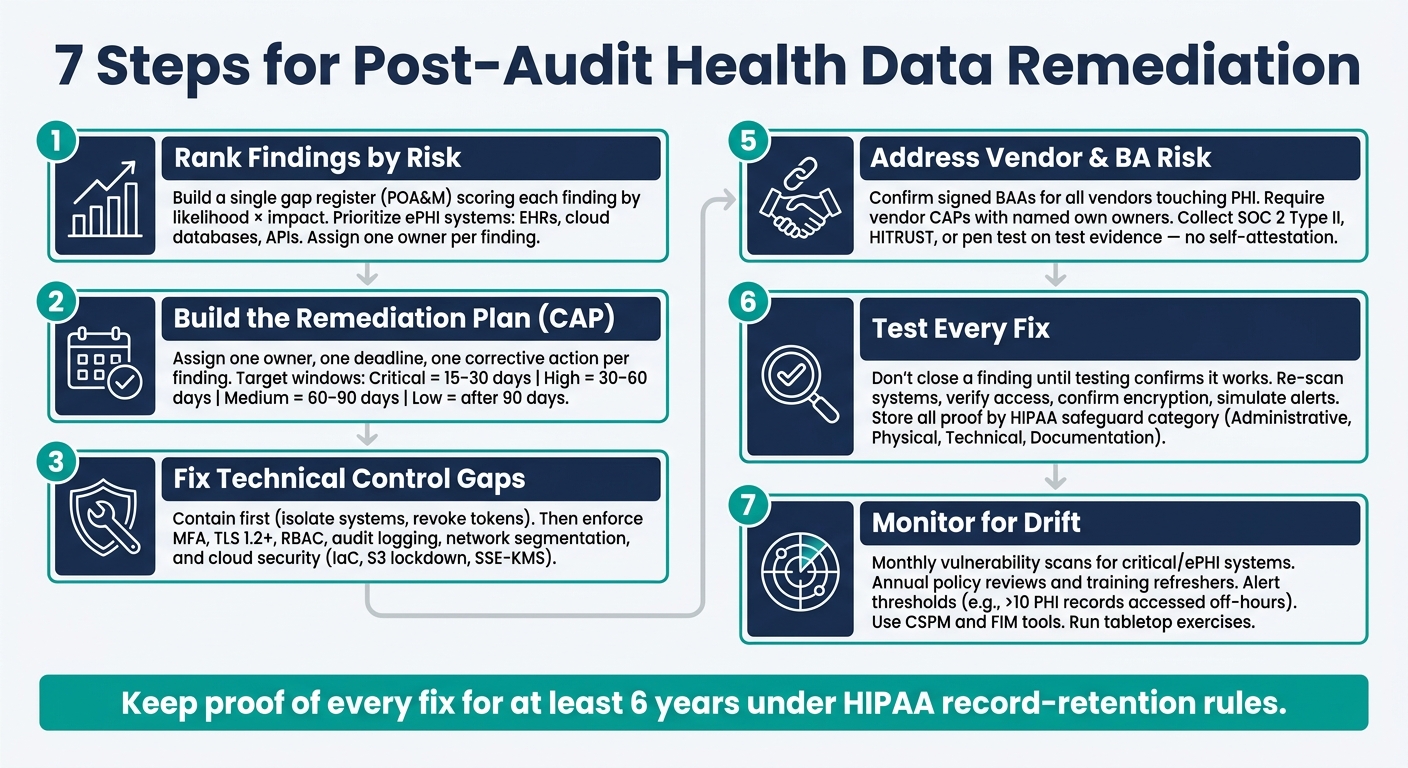
7 Steps for Post-Audit Health Data Remediation (HIPAA)
Steps 1-2: Prioritize Findings and Build a Risk-Based Remediation Plan
Step 1: Organize Findings by Risk, System, and Control Type
Start by putting every finding into one ranked inventory. Build a single gap register, or POA&M, that pulls in results from HIPAA audits, internal reviews, vulnerability scans, and penetration tests [3][5].
For each finding, log the affected system, the safeguard category, and a likelihood × impact risk score [1][10]. Put ePHI systems at the top of the pile, especially EHR platforms, cloud databases, and connected APIs. Then assign each item to one owner so fixes can move at the same time instead of getting stuck in a bottleneck. In practice, that usually means technical gaps go to the Security Officer, while policy gaps go to the Privacy Officer [2][3].
Just as important, write down why each risk got its rating and note any accepted residual risk. That paper trail matters. Auditors look at the decision process, not only the final result [1][5].
Step 2: Build a Remediation Plan Based on Risk and Deadlines
Once the register is ranked, turn it into a dated CAP. Use the gap register to assign one owner, one deadline, and one corrective action for each finding. Add an executive sponsor and note any vendor dependencies too [3][4].
Use these target windows:
- 15–30 days for critical items
- 30–60 days for high-risk items
- 60–90 days for medium-risk items
- Low-risk items after that [5][8]
If a vulnerability is being actively exploited, send it straight to incident response [5].
Each task also needs clear exit criteria. In plain English, what proof shows the fix is done? “100% MFA enforced” or “audit log coverage across all EHR interfaces” works because those targets are specific. “MFA improved” doesn’t work because no one can tell when the job is finished.
This kind of risk-based sequencing helps teams close the most dangerous gaps first and put time and budget where they cut exposure fastest.
HIPAA also requires remediation records to be kept for at least six years [8][3].
sbb-itb-f5765c6
Steps 3-5: Fix Technical Gaps, Update Governance, and Address Vendor Risk
Step 3: Apply Technical Safeguards to Reduce Exposure
Use the CAP to move your highest-risk findings into immediate containment and repair. Start with containment first: isolate affected systems, revoke or rotate exposed credentials or API tokens, and block data exfiltration paths such as outbound traffic or unauthorized file sharing [1].
Then move into the first fix cycle. Enforce MFA, tighten session policies, disable weak ciphers by requiring TLS 1.2 or higher, and turn on detailed logging for authentication and administrative actions [6][7]. Encryption at rest, network segmentation, and privileged access management usually fit into the 30- to 60-day window [6][8].
Least privilege matters here. Use RBAC so staff can access only the minimum PHI needed for their job functions [3][8]. In cloud environments, use Infrastructure as Code (IaC) to block public access to S3 buckets and require server-side encryption (SSE-KMS) by default [7]. Also enable centralized audit logging across EHRs, databases, and identity providers, then set alert thresholds and response SLAs for off-hours PHI access [7].
For AI-powered health apps like Healify that handle wearable and biometric data, technical safeguards should also cover secure API handling, consent-based data handling, and strong protections for biometric and wearable data [3][7].
Step 4: Update Policies, Procedures, and Workforce Training
Once the technical fix is in place, update the policies and training that support it. Revisit access control standards, incident response, and vendor management policies so they match the new controls [3]. If needed, publish procedures and job aids that turn those policies into clear day-to-day tasks [3][9].
There’s a simple way to think about it: policy and training back up the fix, while technical controls cut risk.
Swap out generic once-a-year training for role-based refreshers for clinicians, IT staff, and billing teams. Each group deals with different problems, from misdirected emails to overly broad system access to misconfigured integrations [1][3]. Add just-in-time microlearning right after a policy change or incident, when the lesson is still close to the work [1].
Keep signed acknowledgments and quiz scores as proof. Auditors want evidence that staff finished training, not just that a session appeared on the calendar [3][7].
Step 5: Require Corrective Action from Vendors and Integrated Platforms
After you handle internal fixes, apply the same standards to vendors and integrated platforms. Keep a register of every Business Associate, cloud service, API, and integrated platform that touches PHI, and confirm that each one has a signed BAA in place [1][6].
BAAs should spell out privacy and security terms, subcontractor flow-downs, audit rights, and breach-notification windows that support your 60-day deadline [1][2]. Each vendor should also provide its own remediation plan, with named owners and due dates.
Don’t rely on self-attestation. Ask for evidence instead, such as SOC 2 Type II reports, HITRUST certifications, or penetration test summaries [1][6]. For Healify, verify controls for consent, retention, sharing, export, and account deletion [1][3][8]. Only close out a vendor after return-or-destruction proof is on file [1].
Steps 6-7: Validate Remediation and Set Up Continuous Monitoring
Step 6: Test Controls and Document Proof of Remediation
Don’t close a finding just because a fix was deployed. Close it only after testing shows the fix works.
Once the change is live, validate it before marking the finding complete. Re-scan the system, retest the control, check account access against HR records, confirm encryption settings, and simulate an alert to show logging works as expected.
Set acceptance criteria before testing starts, not after. Each finding needs a clear pass/fail standard tied to the control objective in the remediation plan. That keeps everyone on the same page and cuts out guesswork about whether the issue was actually fixed.
It also helps to keep all proof in one place. Build a central evidence repository organized by HIPAA safeguard category: Administrative, Physical, Technical, and Documentation. For each finding, record the owner, the fix that was made, the completion date, and the proof on file.
| Artifact Type | Examples of Evidence to Retain |
|---|---|
| Technical Proof | Re-scan results, configuration screenshots, log excerpts, system diffs |
| Administrative Proof | Updated policies, signed BAAs, risk assessment reports |
| Workforce Proof | Training completion rosters, signed policy acknowledgments, quiz scores |
| Operational Proof | Change tickets, approval logs, incident response timelines |
| Exception Proof | Risk acceptance forms with rationale, compensating controls, and expiration dates |
Some fixes just aren’t possible in the normal way. A legacy medical device that can’t be patched is a common example. In that case, log a formal exception in your risk register. Include the reason, the compensating controls, and the exception’s expiration date.
Step 7: Build Continuous Monitoring into Daily Operations
Testing a fix is one thing. Keeping that control from slipping later is the day-to-day job.
Continuous monitoring helps stop remediated controls from drifting back into risk. After validation is done, move the control into daily monitoring. That’s what keeps you ready for an audit: catching drift early, before it turns into another finding.
Start with ownership. The Security Officer is accountable for HIPAA Security Rule compliance as a whole. A Vulnerability Management Lead handles triage and reporting. System and application owners put technical fixes in place. Compliance and privacy officers help keep documentation in line.
Then set a risk-based review cadence. For example:
- Monthly vulnerability scans for critical systems and systems that host ePHI
- Annual policy reviews
- Annual or role-specific training refreshers [5][3]
Alerting also needs hard thresholds. Don’t leave it vague. A plain example: trigger an alert when more than 10 PHI records are accessed during off-hours, outside 7:00 AM–7:00 PM, or when a break-glass emergency account is used [3]. CSPM and FIM tools can help catch configuration drift, where a remediated setting quietly flips back to an insecure state.
You should also pressure-test the monitoring program itself. Run tabletop exercises to see whether monitoring supports incident response when things get tense. Use those exercises to test both incident response and disaster recovery.
Master HIPAA Compliance: The Ultimate 2025 Checklist for Healthcare Organizations
Conclusion: A 7-Step Checklist for Stronger Health Data Security
Post-audit remediation is a structured process, not a one-time cleanup. After you test fixes and put monitoring in place, use this checklist to keep the work moving in the right direction.
Use these seven steps in order: prioritize findings, assign owners and deadlines, fix controls, update governance, hold vendors accountable, verify remediation, and monitor for drift.
Each finding should have one accountable owner, a clear success criterion, and documented proof before you close it.
The goal is to protect ePHI every day, not just pass the next audit.
FAQs
What should we do first after an audit report?
First, stabilize the environment and stop more compliance problems from piling up by containing the issues you’ve already found. Pause, adjust, or fix noncompliant workflows or system settings as soon as possible.
Then log each finding, map it to the affected assets, assign an owner, and bring in legal, privacy, security, and operations teams so they can make fast, documented decisions.
Who should own each remediation item?
Assign each remediation item to one accountable owner so responsibility stays clear. Ultimate accountability can't be handed off.
Use a cross-functional team that may include the HIPAA Security Officer, HIPAA Privacy Officer, and groups like IT, HR, and Engineering. Track each role in a RACI matrix so it's clear who is responsible, accountable, consulted, and informed. Also name one accountable executive to oversee progress and document due diligence.
How do we prove a finding is fully closed?
Check that the fix works and meets the success criteria you set at the start. Do that with focused testing, such as:
- Configuration checks
- Sample testing
- Targeted mini-audits
The goal is simple: prove the issue is fixed in practice, not just on paper.
Then pull together an evidence pack tied back to the original finding. That pack should include policy updates, system logs, screenshots, training acknowledgments, and validation reports. If someone reviews the file later, they should be able to follow the chain from the finding to the fix without guessing.
Wrap it up with a formal memo that sums up the evidence, any residual risk, and the final sign-offs. This gives you a clear, auditable trail.